
And if you close your eyes
Does it almost feel like you've been here before?
- Bastille - Pompeii (...via Pink Lion Cub)
In which the brainworms get us to test things that others aren't necessarily doing.
So, we were lucky enough to get a Steam Frame in one of the early batches. We are also lucky enough to own multiple other headsets, and enough of an idiot to own an Apple Vision Pro.
And that leaves us in a... fairly unique position. A lot has been written and spoken about the Frame vs. Meta's Quests for gaming, which tends to favour the Frame slightly in terms of performance but the main story is the price vs. privacy angle.
There are a lot fewer comparisons looking at the "spatial computing" angle, to borrow Apple's term, and for the moment, that's the angle that interests us more than games. It would have been different a few weeks ago, when our desktop's motherboard failed during a case swap. It might be different when we next end up travelling long distances, but that won't be for a while. When Fluxpose and the Babble Pro tracker start shipping, that might be when we swap to the Frame for games - to not just have the flexibility of movement, but to be able to show it off as well.
The spatial computing angle is what initially got us interested in rumours about Frame when it was still known as Deckard - that Valve was planning "portals" where you could carve out bits of the physical world to see.
And so. This is a blog post about initial impressions after a few days, things that other reviews won't cover. It is written without searching for much about the Frame beyond removing one particularly annoying desktop app from view, [1], and how to record videos outside of the built in Steam Game Recording. [2]
We have an intermediate working knowledge of Linux; we don't mind delving into the terminal to fix something but we don't know where everything is. We also have some of our notes on the Steam Deck, like how to install Rust to install lnshot.
a raspberry pi for the face
The comparison we've made before is "an iPad for the face" vs. "a Steam Deck for the face". A walled garden vs. an oasis of hardware you control. A mobile phone company that had no idea what they were doing in VR to the extent they put a lot of heavy metal and glass on a thing meant to be worn on your face for hours, vs. one of the longest most consistent champions of the industry. It should be a slam dunk in Valve's favour. We want it to be a slam dunk.
And yet.
Valve made a lot of compromises with the Frame at an attempt to hit a more-mainstream price point. Some of the stranger decisions in software seem more geared towards the mainstream as well. However, through no fault of their own, the price has been pushed back towards enthusiast territory, and I have a suspicion some will find it wanting. [3]
In other areas, the software is oddly not mainstream. After setup finished, I was expecting to at least be directed towards the SteamVR Tutorial [4], The Lab, or Half-Life Alyx as examples of how to use the hardware. But no - maybe it's an account specific thing with a lot of hours in VR already on file - but it just went to the SteamVR dashboard with no fanfare. (The Steam Deck never took us to Aperture Desk Job either, so maybe we should have expected this). All the help videos are buried in a menu.
comfort
On the one hand, this is one area where it doesn't feel right to review the Steam Frame right now, because our configuration isn't as we'd like it.
On the other hand, we have what we have.
Valve's marketing makes it seem like using the attached eye spacer, it's fine to wear glasses in the Frame. At least for us, this causes it to ride awkwardly on the nose. From what I remember, this was also true of the Oculus Quest 1 before we got prescription lenses for that - but because we weren't expecting it to ship this early, we haven't done that for the Frame yet. [5]
The bigger problem is the Ergonomic Accessories Kit being sold out when we went to order. It includes a top strap, and grips for the controllers that should make them feel more like the Index Knuckles. We're not used to the Frame controllers yet, but our initial impression without those grips is that they're substantially clunkier than any VR controller we've used before. The have a large face which feel substantially closer to standard gamepads, with full size analogue sticks that are helpfully on the wrong side compared to most other VR controllers.
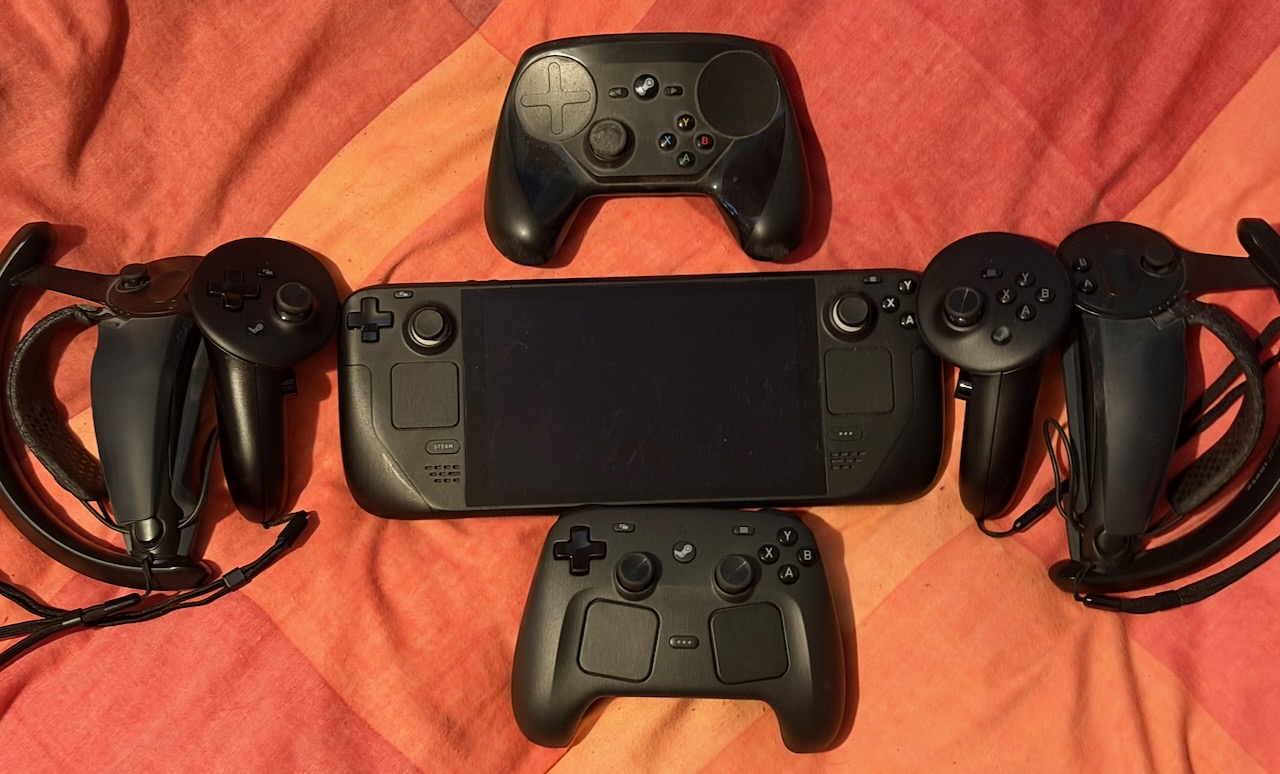
The size is great for repairability (the Index Knuckles are a pain to take apart) and for that goal of playing flatscreen games - but at least right now, it feels like it compromises them being good VR controllers. Maybe we'll get used to them in time, maybe accessories will fix them (as you can see above, we've got rubber grips on our Index Knuckles too), but that's how they are right now.
desktop dilemmas
On Steam Deck, Gaming Mode is isolated from Desktop Mode, hidden in the Power menu. Easy to access for someone determined to install EmuDeck, but it's not going to bother a mainstream user.
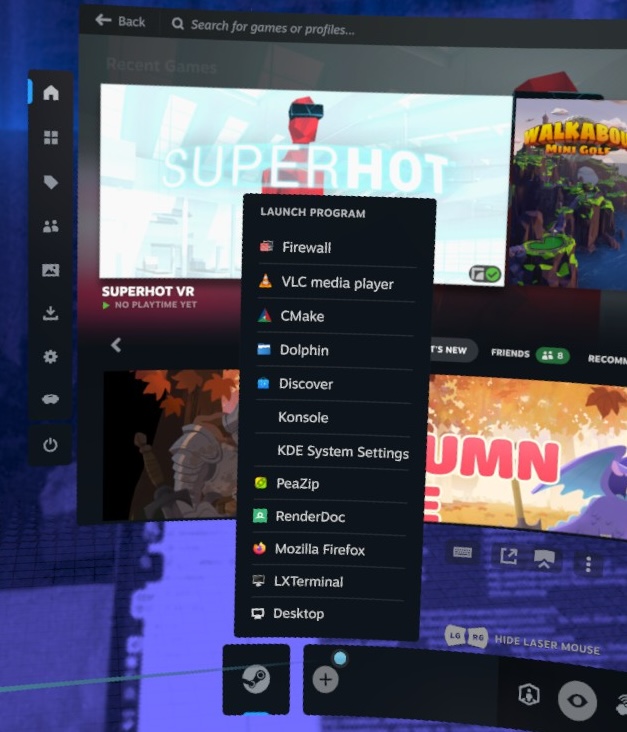
On Frame, the desktop is a lot more intermingled; individual desktop apps accessible at any time from the SteamVR dashboard, with an option to load the full desktop at the bottom. This is nice as a reminder that it is just a computer. It is also terrible, because it prepopulates this quick access list with desktop apps that you absolutely do not need quick access to. So far, without searching, without looking at the documentation it came with (which I suspect is mostly health and safety), I have not figured out how to change them.
On an iPad, you move an app to another place on the home screen by tapping and holding until it goes into "jiggle mode", then tap and hold and move it around to where you want it to go.
On Vision Pro, you move an app to another place on the home screen by pinching and holding until it goes into "jiggle mode", then pinch and hold and move it around where you want it to go.
That is the nuance our previous idea of referring to the Vision Pro as "an iPad for the face" missed - an iPad might be severely limited in what it can do when the hardware is so much more capable, but at the very least, everything's intuitive; the hardest system gesture is the "flip hand over to get to Control Centre" one.
The power of the Frame as a spatial computing device is that you have full desktop Linux. But Valve has not magically fixed the problems that come with trying to use a desktop with VR controllers. KDE Plasma runs with default window controls, which mean small touch targets. Having to manage windows using controllers kind of reveals the reason every other standalone headset has gone for hand tracking, because it's just nicer if you want to move the video you're watching around.[6] Typing with VR controllers still brings out the need to hunt and peck. Typing on the Vision Pro is worse given the lack of any haptic feedback, but Apple do at least provide dictation everywhere the keyboard pops up.
Now, you can absolutely connect a Bluetooth keyboard and mouse. I suspect that is what most who want to do these kind of tasks will do. But out of the box, it lacks the elegance of just using the keyboard and mouse of a connected computer being displayed in a window, switched like a KVM.
linux lamentations
Linux does still have a lot of advantages. This is the only standalone headset you can ssh into without jailbreaking or rooting, of course. That's how I got all the screenshots and videos off it for this article, using rsync!
Here comes the "but" - you can't really do that while still wearing the thing:

A lot has been made of the Frame's passthrough only being monochrome. The bigger issue is that it's not great monochrome. It is enough that you don't trip over things in your room, and not much better.
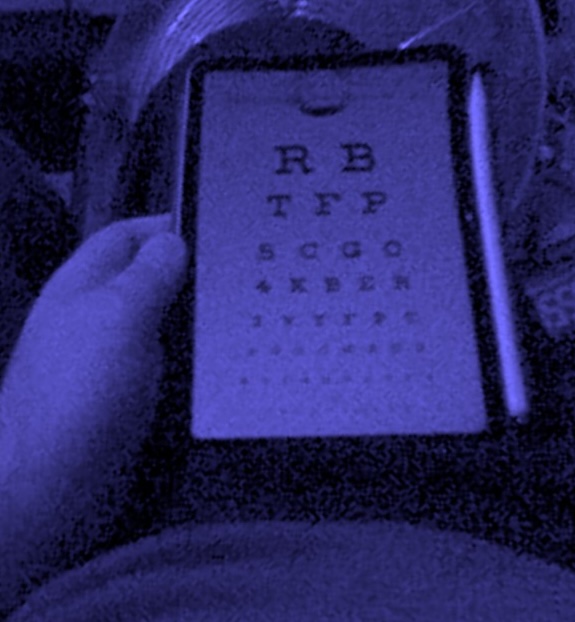
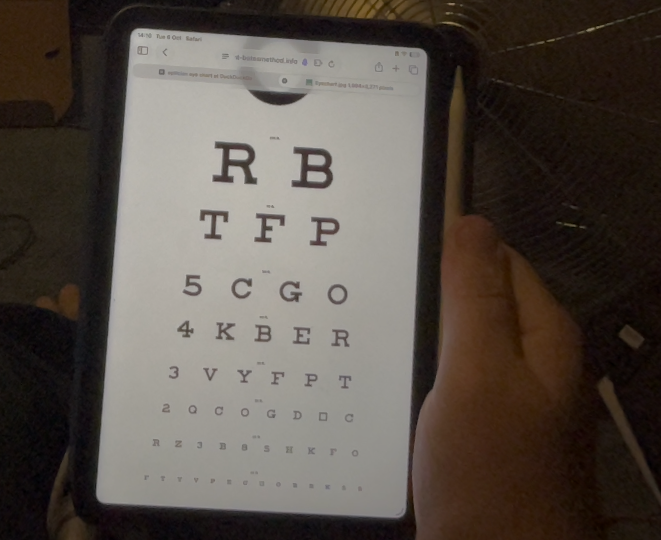
The above was our second attempt at taking this photo on the Frame. On the first attempt, we left the iPad at the brightness we normally have it at, and that was enough to blow out the IR camera I guess?
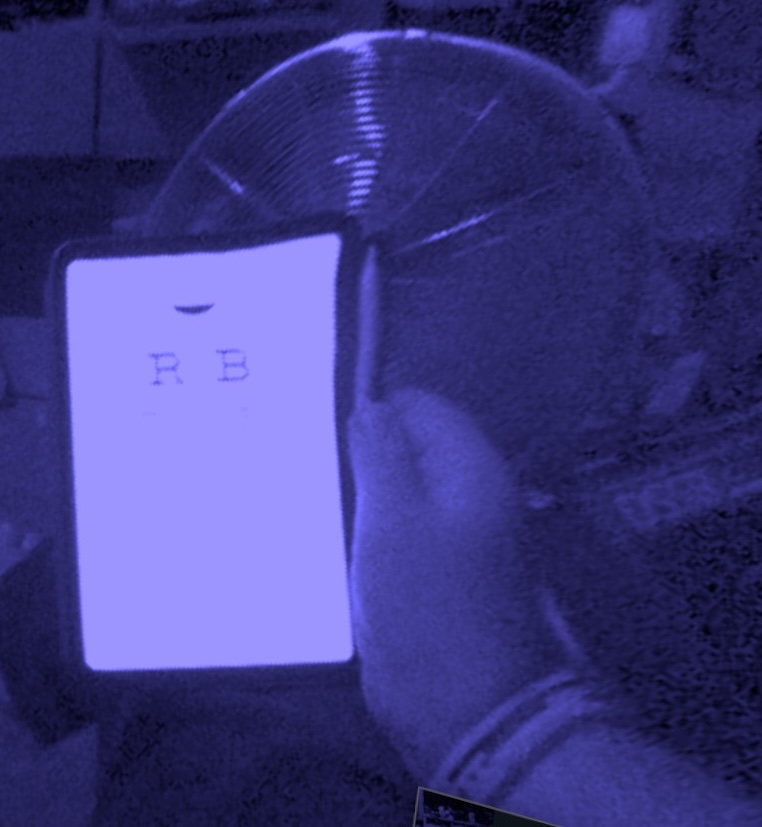
There's already a third party accessory that fixes this one - the Arcturus Vision camera advertised during the purchase process. However, there is also only one expansion port, and we'd like to get a Babble Pro mouth tracker when those are released, so there wouldn't be too much point.
Without that, you basically need to stream from a PC to enter terminal commands into the headset while wearing it. And that is an incredibly niche use case - but it also impacts things like checking your phone for a password, or everyone's favourite Furality activity of doing last minute tweaks in Unity while still inside VRChat.
Additionally, what you have on the Frame is full desktop Linux... but the ARM64 variant. Some of the applications you might want to make use of may not have been recompiled. I had an idea of putting the Archipelago launcher on the thing and having a spatial tracker window while still playing a game in a 2D window in front... but both the Archipelago launcher and the game we wanted to play are currently x86 only. I'm sure there is a way to invoke the compatibility layer in desktop mode, but again, we wanted to understand how friendly it is as a new user jumping straight into the desktop.
decked out
Valve does try and make use of the muscle memory you already have... but weirdly. If you've used SteamVR before, you know the drill - the controller acts as a laser pointer, point to the thing you want and trigger to select.
Except that also isn't the way it works; by default, the menus are navigated like the Steam Deck instead, with the controller laser disabled - and the Select/View button navigating between the different parts of the SteamVR dashboard. You have to hit one of the grip buttons to bring back the pointer. And it loves to set you back to gamepad only mode.
If there's an option to change this to always use the pointer, we haven't found it yet. It feels particularly odd given that a lot of settings menus do not actually work in gamepad mode and prompt for switching back!
conclusions
Every VR/AR/MR/XR device is a mixture of compromises. It all depends on which ones you can bear to take given the advantages they bring.
For Meta's devices, the compromise is simple - Facebook wants all your data and will make your device worse if they think they can get more data out of you. You can expect more encouragement to give their AI agent access to all your emails in the coming months. (Please do not give Facebook's AI agent access to your emails). As an advantage, you get the hardware relatively cheaply because their money is being made elsewhere.
For Apple Vision Pro, the massive compromise is price. The secondary compromise is app selection; Apple pissing off developers for their pound of flesh has not exactly endeared them to develop apps that take advantage of the hardware that no one has bought. The tertiary compromise is that if you do want to stream VR games from your PC, good luck - it might work, 9 out of 10 times, it doesn't for us. (And then there's the matter of the PSVR2 controller support, which is a problem when you live somewhere they're not sold separately from the PSVR2... [7])
But even now, a year plus into owning the thing - every time I use it, it still feels like the fucking future in ways no other headset we've used does (again with the caveat we haven't tried Android XR). It's still our preferred way to look through old photos and notice details we haven't before, or watch a movie that truly deserves a cinema screen. We're still collecting 3D Blu-Rays from CEX to rip to watch in it. All of that absolutely isn't worth the price of admission as it exists today unless you're a sicko[8]. But I do genuinely hope Apple can get this experience into a more affordable form at some point.
The Steam Frame as it exists right here, close to launch, is not what Deckard was rumoured to be. I don't know if anything could have been without crossing at least the $1500 price point before RAMageddon pushed everything up further. It wouldn't be as light or as comfortable, and the battery life could have been even more of a problem.
For the intended use cases, I'm sure the Frame works great. If you want to play Beat Saber[9] without getting all tangled up in your third replacement Valve Index cable, that might be enough of an incentive to upgrade for some. Right now, we don't have enough of a reason to use the Frame over the Bigscreen Beyond for VR games at this moment (given that the games we play are less active, we don't have the space right now to dance more aggressively than we do, the Beyond is currently more comfortable, and our trackers are Lighthouse based). That will likely change over time - particularly as we get into winter and may want to be under blankets more, or if we clean out the front room to give ourselves more space without having to move the base stations.
But it is mainstream hardware at an enthusiast level price. It feels like it was planned as an upgrade path for Steam Deck owners with no other interest in VR than playing their games on a big floating screen - and that's an audience I'm not sure exists generally but particularly not at the price point they've been forced up to. So many compromises are in service of this goal, and at least for us... if I want to play a flatscreen game, I'm probably grabbing a regular controller? Unless it's something we like but is also knackered like The Wonderful End of the World - which is old enough that it has gamepad support in game but needs a mouse for menu navigation. But even in that scenario, Steam Input provides a lot of workarounds now.
At the same time, I don't know if that compromise matters. Since the Frame launched, we've seen VR games that haven't been touched by the developers in years receive updates. While we haven't gone looking for the sake of this article not being longer than it is, I know there are Linux developers working tirelessly on making the Frame bend to their whim; far more than will ever make anything for Vision Pro. There is interest in VR again in a way there hasn't necessarily been since the Index and then the pandemic Quest boom - and while it is unfortunately too little, too late for many VR focused studios that ended up shutting their doors this year[10]... I don't know, there's some kind of hope again.
The potential is there. Everything depends on what comes next.
(And now to go figure out the solutions to some of our problems. Though I'm pretty sure they'll be in the responses to this post; the fastest way to learn something about Linux is to be wrong about it on the Internet, after all).
Footnotes
There's an "Install Chromium" stub where holding to right click didn't seem to do much, and installing Chromium and then removing it didn't remove it either. It's part of the read only file system that will be restored with every update, so trying to remove with sudo won't work either. The fix is to make a copy to your user directory and then append an option to it -
cp /usr/share/applications/org.chromium.Chromium.desktop ~/.local/share/applications/ && echo "NoDisplay=true" >> ~/.local/share/applications/org.chromium.Chromium.desktop. For sanity's sake, we recommend doing this over ssh. (Also this may not work because it seems to come back sometimes). ↩︎We're using Framecorder for this which I'm pretty sure is completely vibecoded. It's getting uninstalled after this article is uploaded. ↩︎
Which might be part of why Bigscreen are reporting that Beyond 2 sales are up. ↩︎
You know, the one that everyone forgets. I have legitimately no idea if it's even possible to access this on Frame given it normally lives in the SteamVR desktop menu. ↩︎
Also kind of an awkward moment given that our last eye test was early 2025 and we're not due another until early 2027. ↩︎
I believe third parties are already experimenting with this, though. ↩︎
A whole PSVR2 just for the controllers has been a level of depravity we've not yet reached, though I can't say we haven't been tempted when we've seen one in the window of Cash Converters. ↩︎
We are still not at the level of some YouTubers using it to replace all monitors, though. ↩︎
It's pronounced "Sabre". ↩︎
The Frame could not have done much against Meta buying studios for them to go nowhere, though. ↩︎